Recent Searches
Category

Microsoft Power BI

Category

Microsoft Copilot Courses

Category

AI for Business

Category

Microsoft Windows 11 Courses

Category

Microsoft 365

Category

Microsoft Excel

Category

Excel Specialist

Category

Microsoft Project

Category

R Programming

Category

Python

Category

Power Apps

Category

SQL

Category

SharePoint

Category

Microsoft Teams

Category

Power Automate

Category

Microsoft Visio

Category

Microsoft PowerPoint

Category

Microsoft Word

Category

Microsoft Outlook

Category

Adobe InDesign Courses

Category

Adobe Photoshop Courses

Category

Adobe Illustrator Courses

Category

Adobe Premiere Pro Training

Category

Adobe After Effects Training

Category

Adobe Acrobat Courses

Category

Adobe Captivate Training

Category

Adobe Animate Training

Category

Canva Courses

Category

HTML Courses

Category

WordPress

Category

Professional Development

Category

Microsoft Access

Category

Webinars

Course

Power BI Beginner

Course

Copilot for M365

Course

Windows 11 End User Course

Course

Excel Beginner

Course

Financial Modelling

Course

Project Beginner

Course

R Programming Beginner

Course

Python Beginner

Course

Power Apps Beginner

Course

SQL Beginner

Course

SharePoint Beginner

Course

Teams Essentials

Course

Visio Essentials

Course

PowerPoint Level 1

Course

Word Beginner

Course

Word Advanced

Course

Word Intermediate

Course

Microsoft Outlook Beginner to Intermediate

Course

InDesign Lite

Course

Photoshop Lite

Course

Illustrator Training Intro

Course

Premiere Training Intro

Course

After Effects Training Intro

Course

Acrobat Essentials

Course

Captivate Training

Course

Animate Training Intro

Course

Canva AI

Course

HTML Training Intro

Course

Achieving Leadership & Success

Course

Microsoft Access Essentials

Course

Copilot for M365 On Demand

Course

Power BI Intermediate

Course

Copilot for Word

Course

ChatGPT Beginner

Course

Microsoft 365 Beginner

Course

Excel Intermediate

Course

Analysis and Dashboards

Course

Project Intermediate

Course

R Programming Intermediate

Course

Python Intermediate

Course

Power Apps Intermediate

Course

SQL Intermediate

Course

SharePoint Intermediate

Course

PowerPoint Level 2

Course

InDesign Training Intro

Course

Photoshop Training Intro

Course

Acrobat Forms

Course

Anger Management & Negotiation Skills

Course

Copilot for M365 Live Online

Course

Power BI Advanced

Course

Copilot for Excel

Course

AI Prompting Fundamentals

Course

Microsoft 365 Intermediate

Course

Excel Advanced

Course

Excel VBA

Course

Project Advanced

Course

R Programming Advanced

Course

Python Advanced

Course

Power Apps Intermediate | Power Automate + Power BI Integration

Course

SharePoint Advanced (Site Owner)

Course

InDesign Training Advanced

Course

Assertiveness & Confidence

Course

Microsoft Access Advanced

Course

Power BI DAX

Course

Copilot for PowerPoint

Course

Excel Expert

Course

Machine Learning in R

Course

Power Apps Advanced

Course

SharePoint Advanced (Document Governance)

Course

Building Resilience

Course

Copilot for Outlook and Teams

Course

Coaching and Mentoring

Course

Illustrator Training Advanced

Course

Premiere Basics Training

Course

Advanced After Effects Training

Course

Canva Beginners

Course

WordPress Essentials

Course

Communications

Course

AI for Business Leaders and Managers

Course

Photoshop Training Advanced

Course

Advanced Premiere Training

Course

Canva Intermediate

Course

Communications & Quality Client Service Training

Course

InDesign Interactivity Training

Course

Canva Advanced

Course

Critical Thinking and Problem Solving

Course

InDesign Accessibility Training

Course

Cultural Diversity in the Workplace

Course

Microsoft Outlook Advanced

Course

Embracing Change

Course

SQL Advanced

Course

Growing Emotional Intelligence

Course

Planner Premium

Course

Minute Taking

Course

Excel Tables and Pivot Tables

Course

Power Automate Beginner

Course

Performance Management

Course

Data Transformation with Power Query

Course

Excel Macro Mastery

Course

Power Automate Intermediate

Course

Persuasion and Negotiation Skills

Course

Power BI Desktop Advanced Reporting

Course

Presentation Skills and Public Speaking

Course

Data Visualisation with Power BI Desktop

Course

Practical Project Management

Course

Respect, Equity and Diversity (RED)

Course

Resumé Writing and Interview Skills

Course

Stress Management

Course

Team Leadership, Management and Development

Course

Time Management Intensive

Course

Train the Trainer

Course

Write Effective Business Documents

Course

Dealing with Difficult People

Course

Managing Difficult Conversations

Course

Managing the Virtual Workplace

Course

Customer Service Training

Course

Technical Writing

Master advanced tools in our Microsoft Word Advanced training course. Learn how to work with SmartArt, long documents, electronic forms, fields and macros to streamline your workflow. You’ll also explore collaboration features such as track changes, comments and document protection.

This advanced Word course is ideal for regular users looking to maximise their productivity and document control. Delivered by expert trainers, our Microsoft Word training is available in-person or online, helping you gain the skills to work more efficiently and professionally.

All courses are available in-person or remotely. 
To attend remotely, select "Remote Online" as your location on book now.

By the end of this course, you will be able to:

  • Create SmartArt, tables of contents, indexes and master documents
  • Use bookmarks, cross-references, footnotes and endnotes
  • Collaborate with others using comments, tracking and version comparison
  • Build forms, use macros, apply document protection and automate tasks in Word

Prerequisite:

There are no formal requirements, but this course is best suited to regular Word users familiar with topics covered in the Intermediate course.

Course Details

Download Course PDF
Price
$385
Duration
1 day
Times
9am-4pm
Class Size (max)
10
Class Size (avg)
5
Reference Materials
Provided
CPD Hours
6 hours
Delivery
Instructor-led training
Live Online

Course Details

Download Course PDF
Price
$385
Duration
1 day
Time
9am-4pm
Class Size (max)
10
Class Size (avg)
5
Reference Materials
Provided
Training Computer
Provided
CPD Hours
6 hours
Delivery
Instructor-led training
Address
Level 8
201 Charlotte Street
Brisbane QLD 4000

Course Details

Download Course PDF
Price
$385
Duration
1 day
Time
9am-4pm
Class Size (max)
10
Class Size (avg)
5
Reference Materials
Provided
Training Computer
Provided
CPD Hours
6 hours
Delivery
Instructor-led training
Address
Level 24/477 Pitt Street
Sydney
New South Wales 2000

Course Details

Download Course PDF
Price
$385
Duration
1 day
Time
9am-4pm
Class Size (max)
10
Class Size (avg)
5
Reference Materials
Provided
Training Computer
Provided
CPD Hours
6 hours
Delivery
Instructor-led training
Address
Level 12A
45 William Street Melbourne VIC 3000

Course Details

Download Course PDF
Price
$385
Duration
1 day
Time
9am-4pm
Class Size (max)
10
Class Size (avg)
5
Reference Materials
Provided
Training Computer
Provided
CPD Hours
6 hours
Delivery
Instructor-led training
Address
NEW LOCATION
Level 2
221 London Circuit
Canberra ACT 2600

Course Details

Download Course PDF
Price
$385
Duration
1 day
Time
9am-4pm
Class Size (max)
10
Class Size (avg)
5
Reference Materials
Provided
Training Computer
Provided
CPD Hours
6 hours
Delivery
Instructor-led training
Address
Level 15
33 King William Street
Adelaide 5000

Course Details

Download Course PDF
Price
$385
Duration
1 day
Time
9am-4pm
Class Size (max)
10
Class Size (avg)
5
Reference Materials
Provided
Training Computer
Provided
CPD Hours
6 hours
Delivery
Instructor-led training
Address
Level 7
553 Hay Street
Perth WA 6000

Course Details

Download Course PDF
Price
$385
Duration
1 day
Times
9am-4pm
Class Size (max)
10
Class Size (avg)
5
Reference Materials
Provided
CPD Hours
6 hours
Delivery
Instructor-led training
Live Online

Upcoming Courses

Remote East

Brisbane

Sydney

Melbourne

Canberra

Adelaide

Perth

Remote West

Remote East
Date
Course
City
Status
Wed 25 Mar 26
Wed
25
Mar
Word Advanced
Remote East
Status: Scheduled
Scheduled
Fri 15 May 26
Fri
15
May
Word Advanced
Remote East
Status: Scheduled
Scheduled
Brisbane

We currently have no public courses scheduled. Please contact us to register your interest.

Sydney

We currently have no public courses scheduled. Please contact us to register your interest.

Melbourne
Date
Course
City
Status
Fri 15 May 26
Fri
15
May
Word Advanced
Melbourne
Status: Scheduled
Scheduled
Canberra
Date
Course
City
Status
Fri 15 May 26
Fri
15
May
Word Advanced
Canberra
Status: Scheduled
Scheduled
Adelaide
Date
Course
City
Status
Wed 25 Mar 26
Wed
25
Mar
Word Advanced
Adelaide
Status: Scheduled
Scheduled
Perth
Date
Course
City
Status
Fri 13 Mar 26
Fri
13
Mar
Word Advanced
Perth
Status: Scheduled
Scheduled
Wed 29 Apr 26
Wed
29
Apr
Word Advanced
Perth
Status: Scheduled
Scheduled
Fri 8 May 26
Fri
8
May
Word Advanced
Perth
Status: Scheduled
Scheduled
Wed 27 May 26
Wed
27
May
Word Advanced
Perth
Status: Scheduled
Scheduled
Wed 17 Jun 26
Wed
17
Jun
Word Advanced
Perth
Status: Scheduled
Scheduled
Remote West
Date
Course
City
Status
Fri 13 Mar 26
Fri
13
Mar
Word Advanced
Remote West
Status: Scheduled
Scheduled
Wed 29 Apr 26
Wed
29
Apr
Word Advanced
Remote West
Status: Scheduled
Scheduled
Fri 8 May 26
Fri
8
May
Word Advanced
Remote West
Status: Scheduled
Scheduled
Wed 27 May 26
Wed
27
May
Word Advanced
Remote West
Status: Scheduled
Scheduled
Wed 17 Jun 26
Wed
17
Jun
Word Advanced
Remote West
Status: Scheduled
Scheduled
Scheduled
Taking enrollments.
Confirmed
Taking enrollments.
Few Seats left
Book Now.
Sold Out
Try another date.

Word Training Courses

Course Icon Word Beginner

Master the basics of Microsoft Word in this hands-on, one-day course. Learn to create and format professional documents with ease.

download course pdf
Price: $360
Course Icon Word Intermediate

Boost your productivity by learning styles, templates, sections and more. Take your Microsoft Word skills to the next level.

download course pdf
Price: $370
MO-101 Word Certification

Earn your Microsoft Word certification and showcase your skills. Includes training, practice exam and official MO-101 exam.

Price: 

$1255
inc GST

Word Advanced Course Content

Expand All | Collapse All

Smart Art

Understanding SmartArt

Inserting a SmartArt Graphic

Inserting Text

Indenting Text

Changing the SmartArt Style

Changing SmartArt Colours

Changing a SmartArt Layout

Adding More Shapes to SmartArt

Resizing SmartArt

Master Documents

Understanding Master Documents

Understanding Subdocuments

Creating a Master Document

Creating Subdocuments

Working with Master Document Views

Inserting Subdocuments

Formatting a Master Document

Editing Subdocuments

Merging Subdocuments

Splitting Subdocuments

Deleting Subdocuments

Building a Table of Contents

Printing a Master Document

Cross Referencing

Creating Cross-Reference

Deleting Cross-Reference

Proofing

Proofreading Your Document

Using Proofreading Marks

Disabling the Spelling and Grammar Checker

Customising the Spelling Checker

Customising the Grammar Checker

Setting a Different Proofing Language

Translating Selected Text

Setting the Default Language

Tracking

Understanding Tracking Changes

Enabling and Disabling Tracked Changes

Switching Between Simple Markup and All Markup

Using Comments in Tracked Changes

Showing and Hiding Markup

Showing Revisions Inline and in Balloons

Advanced Tracking Options

Accepting and Rejecting Changes

Protection

Understanding Document Protection

Making a Document Read Only

Working with a Read Only Document

Restricting Formatting

Working with Formatting Restrictions

Restricting Editing

Making Exceptions

Stopping Document Protection

Applying an Open Document Password

Applying a Modify Document Password

E-Forms

Understanding Electronic Forms in Word

Creating the Form Layout

Understanding Content Controls

Displaying the Developer Tab

Inserting Text Controls

Setting Content Control Properties

Inserting the Date Picker Control

Inserting Prompt Text

Inserting Formulas

Inserting a Combo Box Control

Inserting a Drop Down List Control

Protecting and Saving the Form

Using an Electronic Form

Editing a Protected Form

Long Documents

Understanding Tables of Contents

Inserting a Table of Contents

Navigating with a Table of Contents

Updating Page Numbers

Updating a Table of Contents

Customising a Table of Contents

Formatting a Table of Contents

Understanding Indexing

Marking Index Entries

Creating an AutoMark File

Marking Index Entries with an AutoMark File

Removing Marked Entries

Generating an Index

Modifying the Index Format

Updating an Index

FootNotes EndNotes

Understanding Footnotes and Endnotes

Inserting Footnotes

Inserting Endnotes

Locating Footnotes and Endnotes

The Footnote and Endnote Dialog Box

Changing the Number Format

Converting Footnotes and Endnotes

Deleting Footnotes and Endnotes

Breaks

Understanding Building Blocks

Inserting a Building Block

Creating Quick Parts

Saving Building Blocks

Inserting Quick Parts

Editing Building Blocks

Deleting Building Blocks

Saving Building Blocks to a Template

AutoText versus Quick Parts

Collaboration

Co-Authoring Documents

Saving to SkyDrive

Sharing Documents

Opening Shared Documents

Comparing Docs

Understanding Document Comparisons

Selecting Documents to Compare

Accepting and Rejecting Changes

Saving the Revised Document

Fields

Understanding Fields

The Field Dialog Box

Inserting a Document Information Field

Setting Field Properties

Showing and Hiding Field Codes

Showing and Hiding Field Shading

Inserting Formula Fields

Inserting a Date and Time Field

Updating Fields Automatically When Printing

Locking and Unlocking Fields

Applying a Number Format

Macros

Understanding Macros in Word

Setting Macro Security

Saving a Document as MacroEnabled

Recording a Macro

Running a Macro

Assigning a Macro to the Toolbar

Assigning a Keyboard Shortcut to a Macro

Editing a Macro

Creating a Macro Button Field

Copying a Macro

Deleting a Macro

Tips for Developing Macros

Frequently Asked Questions

What is Remote Training?

Remote training at Nexacu means our experienced trainers will deliver your training virtually. With remote learning, students can access our usual classroom training courses via video conferencing, ask questions, participate in the discussion and share their screen with the trainer if they need help at any point in the course. Students have the same level of participation and access to the trainer as they would in classroom training sessions.

Which courses are available if I am working from home?

Currently, all of our Public Courses are available to be delivered remotely. Book any course as normal and you will receive login details and instructions the evening before your course.

How can I prepare if I am attending an online course?

You need to install the latest version of Word and ensure you have the appropriate license to use it. 

The browser you use is very important. It is recommended you use Chrome, Edge, or Firefox. The latest version must also be installed. Note that Internet Explorer is not compatible with our delivery technologies. 

Windows 10 is highly recommended as the operating system you use. If you are using an apple device, use Safari or a similar modern browser if you cannot use any of the browsers recommended above. Your training experience may diminish due to different features and appearances. Nexacu's trainers are unable to provide detailed guidance for macOS.

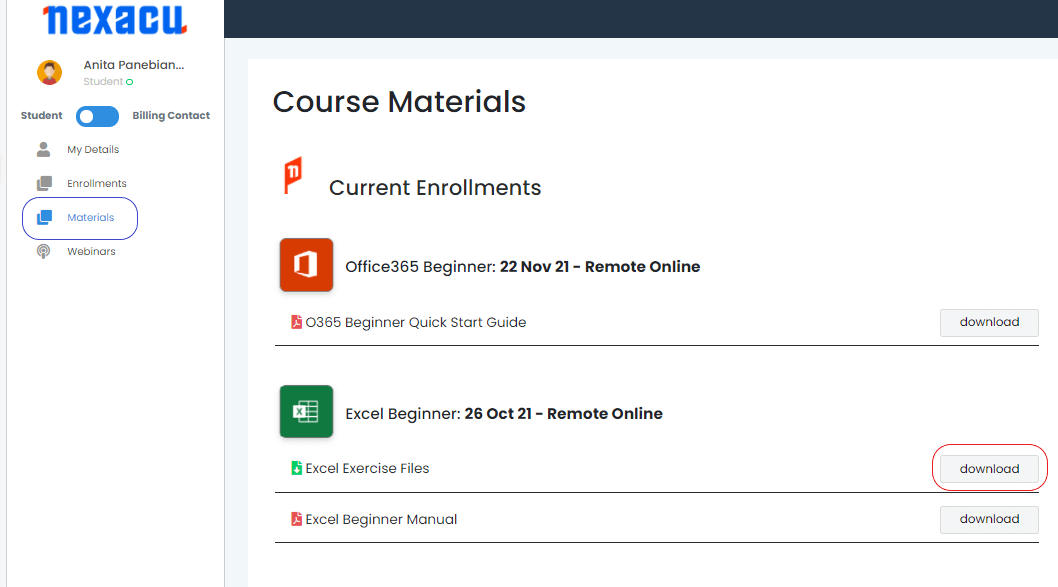
To download and unzip files, log in to your student portal. Click on the "Materials" tab and download your exercise files. 

materials tab Nexacu Hub

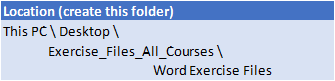
Extract your Exercise Files to the specified folder below. Note you will have to create this folder first. 

file location

Course Details

Download Course PDF
Price
$385
Duration
1 day
Times
9am-4pm
Class Size (max)
10
Class Size (avg)
5
Reference Materials
Provided
CPD Hours
6 hours
Delivery
Instructor-led training
Live Online

Course Details

Download Course PDF
Price
$385
Duration
1 day
Time
9am-4pm
Class Size (max)
10
Class Size (avg)
5
Reference Materials
Provided
Training Computer
Provided
CPD Hours
6 hours
Delivery
Instructor-led training
Address
Level 8
201 Charlotte Street
Brisbane QLD 4000

Course Details

Download Course PDF
Price
$385
Duration
1 day
Time
9am-4pm
Class Size (max)
10
Class Size (avg)
5
Reference Materials
Provided
Training Computer
Provided
CPD Hours
6 hours
Delivery
Instructor-led training
Address
Level 24/477 Pitt Street
Sydney
New South Wales 2000

Course Details

Download Course PDF
Price
$385
Duration
1 day
Time
9am-4pm
Class Size (max)
10
Class Size (avg)
5
Reference Materials
Provided
Training Computer
Provided
CPD Hours
6 hours
Delivery
Instructor-led training
Address
Level 12A
45 William Street Melbourne VIC 3000

Course Details

Download Course PDF
Price
$385
Duration
1 day
Time
9am-4pm
Class Size (max)
10
Class Size (avg)
5
Reference Materials
Provided
Training Computer
Provided
CPD Hours
6 hours
Delivery
Instructor-led training
Address
NEW LOCATION
Level 2
221 London Circuit
Canberra ACT 2600

Course Details

Download Course PDF
Price
$385
Duration
1 day
Time
9am-4pm
Class Size (max)
10
Class Size (avg)
5
Reference Materials
Provided
Training Computer
Provided
CPD Hours
6 hours
Delivery
Instructor-led training
Address
Level 15
33 King William Street
Adelaide 5000

Course Details

Download Course PDF
Price
$385
Duration
1 day
Time
9am-4pm
Class Size (max)
10
Class Size (avg)
5
Reference Materials
Provided
Training Computer
Provided
CPD Hours
6 hours
Delivery
Instructor-led training
Address
Level 7
553 Hay Street
Perth WA 6000

Course Details

Download Course PDF
Price
$385
Duration
1 day
Times
9am-4pm
Class Size (max)
10
Class Size (avg)
5
Reference Materials
Provided
CPD Hours
6 hours
Delivery
Instructor-led training
Live Online

skills test nexacu

Skills Test

Try our short skills test and find out which course is right for you.

Skills Test

Locations In-Person & Online

Find the nearest location and date that works for you

Locations In-Person & Online

Find the nearest location and date that works for you

Related Training Courses

Course Icon Word Beginner

Master the basics of Microsoft Word in this hands-on, one-day course. Learn to create and format professional documents with ease.

download course pdf
Price: $360
Course Icon Word Intermediate

Boost your productivity by learning styles, templates, sections and more. Take your Microsoft Word skills to the next level.

download course pdf
Price: $370
MO-101 Word Certification

Earn your Microsoft Word certification and showcase your skills. Includes training, practice exam and official MO-101 exam.

Price: 

$1255
inc GST

Locations In-Person & Online

Find the nearest location and date that works for you

Locations In-Person & Online

Find the nearest location and date that works for you

Trusted Nationwide by Leading Organisations

at Nexacu, we're proud to be the trusted training partner for hundreds of leading organisations accross Australia and New Zealand. From government departments to top corporates, we help teams upskill and succeed everyday

  • 400+ companies rely on Nexacu for team training

  • Trusted by federal, state, and local government agencies
  • Delivering training across 9 countries

Why Nexacu?

Books Icon

Step by Step Courseware

Custom workbook included with a step by step exercises

Facility Image 2
Facility Image 3
Facility Image 1

Refresh Icon

Free Refresher

Resit your course for free within 6 Months

More than 1,300 Business trust Nexacu

Trusted by Business

Procured by Government

Procured by Goverment

Reviews Not Found

Valued by Individuals